<?xml version="1.0" encoding="UTF-8"?>
<feed xmlns="http://www.w3.org/2005/Atom" xmlns:wfw="http://wellformedweb.org/CommentAPI/">
  <id>http://ericpi.pixnet.net/blog</id>
  <title><![CDATA[艾瑞克皮的北京生活:: 痞客邦 PIXNET ::]]></title>
  <author>
    <name>ericpi</name>
    <email>ericpi@not-valid.com</email>
  </author>
  <updated>2008-07-25T00:27:00+08:00</updated>
  <published>2008-07-25T00:27:00+08:00</published>
  <link rel="self" href="http://ericpi.pixnet.net/blog" hreflang="zh"/>
  <subtitle><![CDATA[離鄉背景到北京討生活的高雄人, Gentoo Linux 愛好者, 公司都用 FreeBSD, 常常寫 PHP, 偶爾碰碰 Debian/Ubuntu, 最近沉迷於 EeePC]]></subtitle>
  <rights>Copyright 2003-2009 ericpi,Pixnet Digital Media Coporation. All rights reserved.</rights>
  <generator>PIXNET Media Digital Coporation</generator>
  <entry xmlns:wfw="http://wellformedweb.org/CommentAPI/">
    <id>http://ericpi.pixnet.net/blog/post/20455105</id>
    <title><![CDATA[寫 blog 超好用的 Firefox extension - ScribeFire]]></title>
    <updated>2008-07-25T00:27:00+08:00</updated>
    <link rel="alternate" href="http://ericpi.pixnet.net/blog/post/20455105"/>
    <summary><![CDATA[PIXNET 是使用 FCKeditor, 雖然已經算是 blog 網頁編輯器裡面比較好用的, 但在插入連結/圖片時還要彈出視窗、Firefox 的 tab 之間拖曳連結/圖片等都不是很方便.ScribeFire 則可以如下圖所示, 上半視窗查資料, 下半視窗進行文章編輯, 編輯所需的文字/連結/圖片可以從上方瀏覽視窗拖到下方文章中使用, 像我這樣寫一篇文章會開一堆 tab 的人, 這樣拖曳功能實在太方便了 :p以下瀏覽一下 ScribeFire 的功能.文章分類發佈選項書籤與其他分享方式 ScribeFire 設定 ScribeFire 的about ScribeFire 並不直接支援 PIXNET 的系統, 所以需要使用自訂設定的方式, 可以參考 Vector Field on you - [Fx] 新玩意兒：ScribeFire, 另外似乎有時候跟 PIXNET 的系統不太和睦相處, 如果常交替混用 PIXNET 編輯器與 ScribeFire, 很容易發生把一篇文章 clone 了很多份, 所以目前測試最好的操作流程是先用 PIXNET 開新文章, 再用 ScribeFire 編輯/後續維護, 這樣會比較少出狀況.]]></summary>
    <content type="html"><![CDATA[<a href="http://www.pixnet.net/" title="" target="_blank">PIXNET</a> 是使用 <a href="http://www.fckeditor.net/" title="" target="_blank">FCKeditor</a>, 雖然已經算是 blog 網頁編輯器裡面比較好用的, 但在插入連結/圖片時還要彈出視窗、<a href="http://www.mozilla.com/en-US/firefox/" title="" target="_blank">Firefox</a> 的 tab 之間拖曳連結/圖片等都不是很方便.<br /><br /><a dragover="true" href="https://addons.mozilla.org/zh-TW/firefox/addon/1730" title="" target="_blank">ScribeFire</a> 則可以如下圖所示, 上半視窗查資料, 下半視窗進行文章編輯, 編輯所需的文字/連結/圖片可以從上方瀏覽視窗拖到下方文章中使用, 像我這樣寫一篇文章會開一堆 tab 的人, 這樣拖曳功能實在太方便了 :p<br /><a href="http://www.pixnet.net/albums/userpics/9/8/642698/1216969464.jpg" target="_blank"><img border="0" src="http://pic.pimg.tw/ericpi/normal_1216969464.jpg" /></a><br /><br />以下瀏覽一下 <a dragover="true" href="https://addons.mozilla.org/zh-TW/firefox/addon/1730" title="" target="_blank">ScribeFire</a> 的功能.<br />文章分類<br /><img src="http://pic.pimg.tw/ericpi/1216969467.gif" /><br /><br />發佈選項<br /><img src="http://pic.pimg.tw/ericpi/1216969469.gif" /><br /><br />書籤與其他分享方式<br /><a rel="lightbox" lhref="http://pic.pimg.tw/ericpi/1216969470.gif" href="http://pic.pimg.tw/ericpi/1216969470.gif" alt="觀看原圖" title="觀看原圖"></a><a target="_blank" href="http://www.pixnet.net/albums/userpics/9/8/642698/1216969470.gif"><img border="0" src="http://pic.pimg.tw/ericpi/normal_1216969470.gif" /></a><br /> <br /><a dragover="true" href="https://addons.mozilla.org/zh-TW/firefox/addon/1730" title="" target="_blank">ScribeFire</a> 設定<br /><a rel="lightbox" lhref="http://pic.pimg.tw/ericpi/1216969474.gif" href="http://pic.pimg.tw/ericpi/1216969474.gif" alt="觀看原圖" title="觀看原圖"></a><a target="_blank" href="http://www.pixnet.net/albums/userpics/9/8/642698/1216969474.gif"><img border="0" src="http://pic.pimg.tw/ericpi/normal_1216969474.gif" /></a><br /> <br /><a dragover="true" href="https://addons.mozilla.org/zh-TW/firefox/addon/1730" title="" target="_blank">ScribeFire</a> 的about<br /><a rel="lightbox" lhref="http://pic.pimg.tw/ericpi/1216969477.gif" href="http://pic.pimg.tw/ericpi/1216969477.gif" alt="觀看原圖" title="觀看原圖"></a><a target="_blank" href="http://www.pixnet.net/albums/userpics/9/8/642698/1216969477.gif"><img border="0" src="http://pic.pimg.tw/ericpi/normal_1216969477.gif" /></a><br /> <br /><br /><a dragover="true" href="https://addons.mozilla.org/zh-TW/firefox/addon/1730" title="" target="_blank">ScribeFire</a> 並不直接支援 <a href="http://www.pixnet.net/" title="" target="_blank">PIXNET</a> 的系統, 所以需要使用自訂設定的方式, 可以參考 <a href="http://blog.pixnet.net/cookeyholder/post/14783568" title="" target="_blank">Vector Field on you - [Fx] 新玩意兒：ScribeFire</a>, 另外似乎有時候跟 <a href="http://www.pixnet.net/" title="" target="_blank">PIXNET</a> 的系統不太和睦相處, 如果常交替混用 <a href="http://www.pixnet.net/" title="" target="_blank">PIXNET</a> 編輯器與 <a dragover="true" href="https://addons.mozilla.org/zh-TW/firefox/addon/1730" title="" target="_blank">ScribeFire</a>, 很容易發生把一篇文章 clone 了很多份, 所以目前測試最好的操作流程是先用 <a href="http://www.pixnet.net/" title="" target="_blank">PIXNET</a> 開新文章, 再用 <a dragover="true" href="https://addons.mozilla.org/zh-TW/firefox/addon/1730" title="" target="_blank">ScribeFire</a> 編輯/後續維護, 這樣會比較少出狀況.<br /><br />  <div class="more"><a href="http://ericpi.pixnet.net/blog/post/20455105">(Read More...)</a></div>]]></content>
    <category term="軟體嘗鮮"/>
    <wfw:comment xmlns:wfw="http://wellformedweb.org/CommentAPI/">http://ericpi.pixnet.net/blog/post/20455105#comments</wfw:comment>
  </entry>
  <entry xmlns:wfw="http://wellformedweb.org/CommentAPI/">
    <id>http://ericpi.pixnet.net/blog/post/20260428</id>
    <title><![CDATA[FreeBSD 設定 PHP 支援 Sqlite3]]></title>
    <updated>2008-07-21T16:46:38+08:00</updated>
    <link rel="alternate" href="http://ericpi.pixnet.net/blog/post/20260428"/>
    <summary><![CDATA[php 4 &amp; 5 內建支援 sqlite 2.x, 想讓 php 支援 sqlite3 就需要裝其他 php extension, 有好幾種方式, 例如: php-sqlite3、PDO_SQLITE, 剛開始很直覺就開始裝 php-sqlite3, 後來發現得用 pear-DB, 既不喜歡 PEAR:DB style, 又嫌裝東裝西麻煩, 最可怕的是 php-sqlite3 官方首頁明白寫著 &quot;Please note that this project is still alpha-quality. Please test and report if it works for you and how it can be enhanced.&quot;, ChangeLog 還一年沒動了...最終還是改用 PDO_SQLITE 稍微安心一點, FreeBSD 安裝 PDO 的方法很簡單, 以下列出兩種安裝方式: 指令無敵安裝法# cd /usr/ports/databases/php5-pdo_sqlite/# make all install堅持要用 php5-extensions 選單的安裝法# rm /var/db/ports/php5-extensions/options# cd /usr/ports/lang/php5-extensions/以下記得勾選 PDO 跟 PDO_SQLITE, 現在 ports 的設定應該這兩樣都是 default# make all install裝完之後, apache 等相關 daemon restart 一下, 簡單寫個程式測試看看, 會動就搞定了.&lt;?&nbsp; $db_file = &quot;/XXX/YYY/ZZZ.db&quot;;&nbsp; // Sqlite 檔案寫在這邊, 需用絕對路徑&nbsp; $dsn = &quot;sqlite:&quot;.$db_file;&nbsp; try {&nbsp;&nbsp;&nbsp; echo $dsn.&quot;\n&quot;;&nbsp;&nbsp;&nbsp; $dbh = new PDO($dsn);&nbsp;&nbsp;&nbsp; $res = $dbh-&gt;query(&quot;SELECT * FROM user ORDER BY uid LIMIT 0,1;&quot;);&nbsp; // SQL指令寫這邊&nbsp;&nbsp;&nbsp; $row = $res-&gt;fetch(PDO::FETCH_ASSOC);&nbsp;&nbsp;&nbsp; print_r($row);&nbsp; } catch (PDOException $e) {&nbsp;&nbsp;&nbsp; echo 'Connection failed: ' . $e-&gt;getMessage();&nbsp; }?&gt;]]></summary>
    <content type="html"><![CDATA[php 4 &amp; 5 內建支援 sqlite 2.x, 想讓 php 支援 sqlite3 就需要裝其他 php extension, 有好幾種方式, 例如: <a href="http://php-sqlite3.sourceforge.net/">php-sqlite3</a>、<a href="http://www.php.net/manual/en/ref.pdo-sqlite.php">PDO_SQLITE</a>, 剛開始很直覺就開始裝 <a href="http://php-sqlite3.sourceforge.net/">php-sqlite3</a>, 後來發現得用 pear-DB, 既不喜歡 PEAR:DB style, 又嫌裝東裝西麻煩, 最可怕的是 <a href="http://php-sqlite3.sourceforge.net/">php-sqlite3</a> 官方首頁明白寫著 &quot;<strong>Please note</strong> that this project is still alpha-quality. Please test and report if it works for you and how it can be enhanced.&quot;, ChangeLog 還一年沒動了...最終還是改用 <a href="http://www.php.net/manual/en/ref.pdo-sqlite.php">PDO_SQLITE</a> 稍微安心一點, FreeBSD 安裝 PDO 的方法很簡單, 以下列出兩種安裝方式:<br /><br /> 指令無敵安裝法<br /># cd /usr/ports/databases/php5-pdo_sqlite/<br /># make all install<br /><br />堅持要用 php5-extensions 選單的安裝法<br /># rm /var/db/ports/php5-extensions/options<br /># cd /usr/ports/lang/php5-extensions/<br />以下記得勾選 PDO 跟 PDO_SQLITE, 現在 ports 的設定應該這兩樣都是 default<br /># make all install<br /><br />裝完之後, apache 等相關 daemon restart 一下, 簡單寫個程式測試看看, 會動就搞定了.<br />&lt;?<br />&nbsp; $db_file = &quot;/XXX/YYY/ZZZ.db&quot;;&nbsp; // Sqlite 檔案寫在這邊, 需用絕對路徑<br />&nbsp; $dsn = &quot;sqlite:&quot;.$db_file;<br /><br />&nbsp; try {<br />&nbsp;&nbsp;&nbsp; echo $dsn.&quot;\n&quot;;<br />&nbsp;&nbsp;&nbsp; $dbh = new PDO($dsn);<br />&nbsp;&nbsp;&nbsp; $res = $dbh-&gt;query(&quot;SELECT * FROM user ORDER BY uid LIMIT 0,1;&quot;);&nbsp; // SQL指令寫這邊<br />&nbsp;&nbsp;&nbsp; $row = $res-&gt;fetch(PDO::FETCH_ASSOC);<br />&nbsp;&nbsp;&nbsp; print_r($row);<br />&nbsp; } catch (PDOException $e) {<br />&nbsp;&nbsp;&nbsp; echo 'Connection failed: ' . $e-&gt;getMessage();<br />&nbsp; }<br />?&gt;  <div class="more"><a href="http://ericpi.pixnet.net/blog/post/20260428">(Read More...)</a></div>]]></content>
    <category term="系統管理"/>
    <wfw:comment xmlns:wfw="http://wellformedweb.org/CommentAPI/">http://ericpi.pixnet.net/blog/post/20260428#comments</wfw:comment>
  </entry>
  <entry xmlns:wfw="http://wellformedweb.org/CommentAPI/">
    <id>http://ericpi.pixnet.net/blog/post/20122261</id>
    <title><![CDATA[[慢半拍] FreeBSD 6.x 升級 7.0 懶人升級法(20080725 update)]]></title>
    <updated>2008-07-18T13:33:42+08:00</updated>
    <link rel="alternate" href="http://ericpi.pixnet.net/blog/post/20122261"/>
    <summary><![CDATA[嚴格來說是慢了半年, 這篇是參考 Izero 的 [how-to] FreeBSD6 遠端升級 FreeBSD 7 的方法, 多數指令也跟 Izero 版相同, 主要是去掉使用 kkupdate 部分, 並把比較沒說明清楚的小細節補上, 這版本比較適用很多想要剪下貼上懶人升級的SA. :p注意事項* 升級過程中大約有一半時間會處於停機狀態, 多數 server daemon幾乎都會停掉* 我慣用 vim, 如果習慣用其他 editor 請自行替換* 我慣用 bash, 如果習慣用其他 shell 請自行替換, 且部分 shell script 也得自行調整* 一定需要知道 root 密碼, 某個階段 sudo 是爛掉的* 事前準備請務必參考 Izero那篇列出指令開幹更改自己的 shell$ chsh 將 Shell: 後方的文字改為 /bin/sh 或是 /bin/tcsh, 按 Esc, 輸入 :wq 儲存.變身成 root$ su -確認自己的帳號是 wheel group# vim /etc/group更改 root 的 shell# chsh將 Shell: 後方的文字改為 /bin/sh 或是 /bin/tcsh, 按 Esc, 輸入 :wq 儲存.更改 RELENG 版本# vim /usr/share/examples/cvsup/releng-supfile搜尋 RELENG_ , 把 RELENG_6_? 改為 RELENG_7_0更新 src &amp; ports#  cd /usr/src &&amp; make update 修改 kernel 設定(請依據自己機器的平台把 i386 改成對應架構) # vim /usr/src/sys/i386/conf/GENERIC 輸入 :vert diffsplit [你的 kernel 設定檔], 7.0 某些 option 改變了, 所以跟 GENERIC 比對一下, 我碰到的情況主要是 GPT(GUID Partition Tables)的參數名稱不太一樣, 部分 device option 改名等,希望效能好一些的話, 把 KTRACE 跟 makeoptions DEBUG=-g 註解起來.編譯 kernel &amp; world# rm -rf /usr/obj/ &&amp; make buildworld &&amp; make buildkernel如果 /usr、/var 等系統資料夾沒使用其他 partition, 可以用以下指令把除了 / 的 partition 都 umount 掉, 不然請手動 umount# umount /*把 cron 停掉#  sh /etc/rc.d/cron stop第一次 install kernel &amp; world# cd /usr/src/ &&amp; make installkernel &&amp; make installworld把設定 merge 一下, 7 跟 6 很多設定檔案都不太一樣, merge 的時候要注意看#  mergemaster -i**注意 以下步驟開始, 機器應該就處於殘廢狀態重開機# sync &&amp; sync &&amp; sync &&amp;  shutdown -r now開完機, 登入之後, 先變身成 root$ su -停掉 cron#  sh /etc/rc.d/cron stop記錄現在系統裝了哪些 ports(這是抄 Izero 的)# cd /var/db/pkg/ &&amp; find . -name '+CONTENTS' | xargs grep " ORIGIN:" | awk ' { match($1, "ORIGIN:"); print "portupgrade -N -m \"BATCH=yes\" \"" substr($2,8) "\""; } ' &gt; /tmp/all_pkg.sh把舊版 ports 砍掉#  cd /var/db/pkg/ &&amp; rm -f pkgdb.db &&amp; pkg_delete *裝 bash# cd /usr/ports/shells/bash &&amp; make all install裝 screen# cd /usr/ports/sysutils/screen &&amp; make all install把 root 的 shell 改回 bash # chsh 將 Shell: 後方的文字改為  /usr/local/bin/bash, 按 Esc, 輸入 :wq 儲存, 登出重新登入, 掛上 screen 並登入 root.裝 portupgrade# cd /usr/ports/ports-mgmt/portupgrade &&amp; make all install把該裝的東西裝回來#  sh /tmp/all_pkg.sh如果該 server 需要跑 6.x/5.x/4.x 編譯出來的程式, 則需要安裝 misc/compatNx library, 請把 N 換成自己需要相容版本的版號, 以下是安裝 6.x 相容為例# cd /usr/ports/misc/compat6x/ &&amp; make all install以下是清除 6.x 的屍體(都是抄 Izero 的)把 /bin /sbin /usr/bin /usr/sbin /usr/libexec /usr/libdata 舊檔案列出來# ( for dir in /bin /sbin /usr/bin /usr/sbin /usr/libexec /usr/libdata; do \       find $dir -mtime +2 -type f -xdev -print; \       find $dir -mtime +2 -type l -xdev -print; \       done ) &gt;/tmp/remove把 /bin /sbin /usr/bin /usr/sbin /usr/libexec /usr/libdata 裡面舊檔案刪掉# cat /tmp/remove | xargs rm -f把 /lib /usr/lib 列出來#  ( for dir in /lib /usr/lib; do \       find $dir -mtime +2 -type f -xdev -print; \       find $dir -mtime +2 -type l -xdev -print; \       done ) | grep -v /usr/lib/compat &gt;/tmp/move移到 /tmp/remove_lib/ 備份# mkdir /tmp/remove_lib/# for x in `cat /tmp/move`; do chflags noschg $x; mv $x /tmp/remove_lib/; done砍掉舊檔案跟函式庫# cd /usr/src &&amp; make BATCH_DELETE_OLD_FILES=YES delete-old delete-old-libs重裝 kernel &amp; world# make installworld &&amp; make installkernel重開機就大功告成! # sync &&amp; sync &&amp; sync &&amp;  shutdown -r now]]></summary>
    <content type="html"><![CDATA[嚴格來說是慢了半年, 這篇是參考 <a href="http://blog.pixnet.net/Izero" target="_blank">Izero</a> 的 <a href="http://blog.pixnet.net/Izero/post/13483782" target="_blank">[how-to] FreeBSD6 遠端升級 FreeBSD 7 的方法</a>, 多數指令也跟 <a href="http://blog.pixnet.net/Izero" target="_blank">Izero</a> 版相同, 主要是去掉使用 kkupdate 部分, 並把比較沒說明清楚的小細節補上, 這版本比較適用很多想要剪下貼上懶人升級的SA. :p<br /><br /><strong>注意事項</strong><br /><blockquote>* 升級過程中大約有一半時間會處於停機狀態, 多數 server daemon幾乎都會停掉<br />* 我慣用 vim, 如果習慣用其他 editor 請自行替換<br />* 我慣用 bash, 如果習慣用其他 shell 請自行替換, 且部分 shell script 也得自行調整<br />* 一定需要知道 root 密碼, 某個階段 sudo 是爛掉的<br />* 事前準備請務必參考 <a href="http://blog.pixnet.net/Izero/post/13483782" target="_blank">Izero那篇</a><br /></blockquote><br /><strong>列出指令開幹</strong><br />更改自己的 shell<br />$ chsh<br /> 將 Shell: 後方的文字改為 /bin/sh 或是 /bin/tcsh, 按 Esc, 輸入 :wq 儲存.<br /><br />變身成 root<br />$ su -<br /><br />確認自己的帳號是 wheel group<br /># vim /etc/group<br /><br />更改 root 的 shell<br /># chsh<br />將 Shell: 後方的文字改為 /bin/sh 或是 /bin/tcsh, 按 Esc, 輸入 :wq 儲存.<br /><br />更改 RELENG 版本<br /># vim /usr/share/examples/cvsup/releng-supfile<br />搜尋 RELENG_ , 把 RELENG_6_? 改為 RELENG_7_0<br /><br />更新 src &amp; ports<br />#  cd /usr/src &&amp; make update<br /><br /> 修改 kernel 設定(請依據自己機器的平台把 i386 改成對應架構)<br /> # vim /usr/src/sys/i386/conf/GENERIC<br /> 輸入 :vert diffsplit [你的 kernel 設定檔], 7.0 某些 option 改變了, 所以跟 GENERIC 比對一下, <br />我碰到的情況主要是 GPT(GUID Partition Tables)的參數名稱不太一樣, 部分 device option 改名等,<br />希望效能好一些的話, 把 KTRACE 跟 makeoptions DEBUG=-g 註解起來.<br /><br />編譯 kernel &amp; world<br /># rm -rf /usr/obj/ &&amp; make buildworld &&amp; make buildkernel<br /><br />如果 /usr、/var 等系統資料夾沒使用其他 partition, 可以用以下指令把除了 / 的 partition 都 umount 掉, 不然請手動 umount<br /># umount /*<br /><br />把 cron 停掉<br />#  sh /etc/rc.d/cron stop<br /><br />第一次 install kernel &amp; world<br /># cd /usr/src/ &&amp; make installkernel &&amp; make installworld<br /><br />把設定 merge 一下, 7 跟 6 很多設定檔案都不太一樣, merge 的時候要注意看<br />#  mergemaster -i<br /><br />**注意 以下步驟開始, 機器應該就處於殘廢狀態<br />重開機<br /># sync &&amp; sync &&amp; sync &&amp;  shutdown -r now<br /><br />開完機, 登入之後, 先變身成 root<br />$ su -<br /><br />停掉 cron<br />#  sh /etc/rc.d/cron stop<br /><br />記錄現在系統裝了哪些 ports(這是抄 <a href="http://blog.pixnet.net/Izero" target="_blank">Izero</a> 的)<br /># cd /var/db/pkg/ &&amp; find . -name '+CONTENTS' | xargs grep " ORIGIN:" | awk ' { match($1, "ORIGIN:"); print "portupgrade -N -m \"BATCH=yes\" \"" substr($2,8) "\""; } ' &gt; /tmp/all_pkg.sh<br /><br />把舊版 ports 砍掉<br />#  cd /var/db/pkg/ &&amp; rm -f pkgdb.db &&amp; pkg_delete *<br /><br />裝 bash<br /># cd /usr/ports/shells/bash &&amp; make all install<br /><br />裝 screen<br /># cd /usr/ports/sysutils/screen &&amp; make all install<br /><br />把 root 的 shell 改回 bash<br /> # chsh<br /> 將 Shell: 後方的文字改為  /usr/local/bin/bash, 按 Esc, 輸入 :wq 儲存, 登出重新登入, 掛上 screen 並登入 root.<br /><br />裝 portupgrade<br /># cd /usr/ports/ports-mgmt/portupgrade &&amp; make all install<br /><br />把該裝的東西裝回來<br />#  sh /tmp/all_pkg.sh<br /><br />如果該 server 需要跑 6.x/5.x/4.x 編譯出來的程式, 則需要安裝 misc/compatNx library, 請把 N 換成自己需要相容版本的版號, 以下是安裝 6.x 相容為例<br /># cd /usr/ports/misc/compat6x/ &&amp; make all install<br /><br /><hr>以下是清除 6.x 的屍體(都是抄 <a href="http://blog.pixnet.net/Izero" target="_blank">Izero</a> 的)<br />把 /bin /sbin /usr/bin /usr/sbin /usr/libexec /usr/libdata 舊檔案列出來<br /># ( for dir in /bin /sbin /usr/bin /usr/sbin /usr/libexec /usr/libdata; do \<br />       find $dir -mtime +2 -type f -xdev -print; \<br />       find $dir -mtime +2 -type l -xdev -print; \<br />       done ) &gt;/tmp/remove<br /><br />把 /bin /sbin /usr/bin /usr/sbin /usr/libexec /usr/libdata 裡面舊檔案刪掉<br /># cat /tmp/remove | xargs rm -f<br /><br />把 /lib /usr/lib 列出來<br />#  ( for dir in /lib /usr/lib; do \<br />       find $dir -mtime +2 -type f -xdev -print; \<br />       find $dir -mtime +2 -type l -xdev -print; \<br />       done ) | grep -v /usr/lib/compat &gt;/tmp/move<br /><br />移到 /tmp/remove_lib/ 備份<br /># mkdir /tmp/remove_lib/<br /># for x in `cat /tmp/move`; do chflags noschg $x; mv $x /tmp/remove_lib/; done<br /><br />砍掉舊檔案跟函式庫<br /># cd /usr/src &&amp; make BATCH_DELETE_OLD_FILES=YES delete-old delete-old-libs<br /><br />重裝 kernel &amp; world<br /># make installworld &&amp; make installkernel<br /><br />重開機就大功告成!<br /> # sync &&amp; sync &&amp; sync &&amp;  shutdown -r now<br /><br />  <div class="more"><a href="http://ericpi.pixnet.net/blog/post/20122261">(Read More...)</a></div>]]></content>
    <category term="系統管理"/>
    <wfw:comment xmlns:wfw="http://wellformedweb.org/CommentAPI/">http://ericpi.pixnet.net/blog/post/20122261#comments</wfw:comment>
  </entry>
  <entry xmlns:wfw="http://wellformedweb.org/CommentAPI/">
    <id>http://ericpi.pixnet.net/blog/post/13175596</id>
    <title><![CDATA[馮小剛新作 - 集結號]]></title>
    <updated>2008-01-18T23:49:10+08:00</updated>
    <link rel="alternate" href="http://ericpi.pixnet.net/blog/post/13175596"/>
    <summary><![CDATA[其實已經看完好幾天了, 但是太忙一直沒時間寫寫心得.最早接觸馮小剛是在 AXN 電影台看到他的 大脕, 相當 &quot;可愛&quot; 的一部黑色喜劇, 那時候還沒注意是他的作品, 後來朋友推薦 天下無賊 才開始慢慢注意到他, 這兩部片子我都相當喜歡, 一方面馮小剛敘事的手法明快, 對於商業電影節奏掌握的頗為準確, 另一方面則是葛優的表演相當搶眼. 後來看了 夜宴...只能說對馮小剛相當失望, 這次看 集結號 則是身邊的大陸朋友對這部片子評價都不差, 加上 gf 相當有興趣, 就到電影院去看了院線.集結號 的開頭就是國共戰爭, 劇情還帶過韓戰, 有不少戰爭場景, 電影中後期則是人物心路歷程的文戲為主.開頭戰爭場景手法、視覺與橋段設計, 讓人覺得受好萊屋影響相當深遠, 感覺上像是 搶救雷恩大兵(Saving Private Ryan)、諾曼地大空降(Band of Brothers)、大敵當前(Enemy at the Gates) 的綜合體, 個人覺得為了凝聚觀眾對角色的認同而灑狗血, 過度用英雄式手法來強調每個角色, 既沒有&nbsp;諾曼地大空降(Band of Brothers) 對角色人性刻畫的張力, 也缺乏 紅色警戒(The Thin Red Line) 那種對戰爭無奈到骨子裡的惆悵, 要大搞商業灑狗血, 又不如 搶救雷恩大兵(Saving Private Ryan)、大敵當前(Enemy at the Gates) 的恰到好處, 對於用戰爭片的心態來欣賞這部電影, 被好萊屋慣壞的觀眾大概會有每種通通學一點, 但是都學不到位的感覺.但是從打完戰之後的劇情, 反而讓人比較感興趣; 我認為馮小剛在小人物小場景的掌握相當出色, 當中後期回歸小人物敘事時, 退伍老兵的偏執貫串了後大半段, 戰爭中每個人的渺小在這邊才漸漸顯露出來, 一個動盪時代的無奈在主角退下戎裝後, 才慢慢的受到注意; 也許因為最近一些遭遇, 所以對後面主角因上級 &quot;棄子&quot; 的決定而大鬧這個場景中階層與犧牲的無奈特別有感覺. 不可否認這部片子多少對共產黨有所美化, 也讓人感覺到烈士這樣的名詞是華人政權一向愛用的牌坊, 透過這種方式作為表彰政權價值的基石, 但是我覺得電影後半部的回歸平淡, 比較讓人感覺到馮小剛的敘事與細緻, 和交雜其中的社會批判.或許片子開頭的灑狗血是為了導演沒玩過大場面的另外一種嘗試, 又或是為了商業市場的重口味不得不然, 雖然我個人對這樣的大半段場景有畫蛇添足之感, 但是其實我覺得也透漏中國在模仿的一個學習歷程, 放大到其他事情來看, 其實這種模仿卻是快速進步的另外一種途徑. 回歸電影來看, 集結號 只算半部戰爭片, 前半部片子慘烈戰爭是為了鋪陳後期主角心路歷程文戲合理性的前奏與賣弄戰爭場面, 後半段反而比較能看到真實的馮小剛. 如果說片子本身, 我會說這是一部比&nbsp;夜宴 好很多, 但是不算太好的片子; 但是從一個在台灣長大的人來說, 這部片子陳述的歷史與我們所唸的頗為不同, 裡面的道德與社會價值呈現卻可以看出兩岸的共通性與差異, 反而帶給我超越電影的一些不同感觸.]]></summary>
    <content type="html"><![CDATA[其實已經看完好幾天了, 但是太忙一直沒時間寫寫心得.<br /><br />最早接觸馮小剛是在 AXN 電影台看到他的 <a title="大腕" name="大腕" href="http://www.mtime.com/movie/10424/" target="_blank">大脕</a>, 相當 &quot;可愛&quot; 的一部黑色喜劇, 那時候還沒注意是他的作品, 後來朋友推薦 <a href="http://zh.wikipedia.org/wiki/%E5%A4%A9%E4%B8%8B%E7%84%A1%E8%B3%8A" target="_blank">天下無賊</a> 才開始慢慢注意到他, 這兩部片子我都相當喜歡, 一方面馮小剛敘事的手法明快, 對於商業電影節奏掌握的頗為準確, 另一方面則是葛優的表演相當搶眼. 後來看了 <a href="http://www.yeyan.sina.com.cn/" target="_blank">夜宴</a>...只能說對馮小剛相當失望, 這次看 <a href="http://www.mtime.com/movie/46029/" target="_blank">集結號</a> 則是身邊的大陸朋友對這部片子評價都不差, 加上 gf 相當有興趣, 就到電影院去看了院線.<br /><br /><a href="http://www.mtime.com/movie/46029/" target="_blank">集結號</a> 的開頭就是國共戰爭, 劇情還帶過韓戰, 有不少戰爭場景, 電影中後期則是人物心路歷程的文戲為主.<br />開頭戰爭場景手法、視覺與橋段設計, 讓人覺得受好萊屋影響相當深遠, 感覺上像是 <a href="http://www.imdb.com/title/tt0120815/" target="_blank">搶救雷恩大兵(Saving Private Ryan)</a>、<a href="http://www.imdb.com/title/tt0185906/" target="_blank">諾曼地大空降(Band of Brothers)</a>、<a href="http://www.imdb.com/title/tt0215750/" target="_blank">大敵當前(Enemy at the Gates)</a> 的綜合體, 個人覺得為了凝聚觀眾對角色的認同而灑狗血, 過度用英雄式手法來強調每個角色, 既沒有&nbsp;<a href="http://www.imdb.com/title/tt0185906/" target="_blank">諾曼地大空降(Band of Brothers)</a> 對角色人性刻畫的張力, 也缺乏 <a target="_blank" href="http://www.imdb.com/title/tt0120863/">紅色警戒(The Thin Red Line)</a> 那種對戰爭無奈到骨子裡的惆悵, 要大搞商業灑狗血, 又不如 <a href="http://www.imdb.com/title/tt0120815/" target="_blank">搶救雷恩大兵(Saving Private Ryan)</a>、<a href="http://www.imdb.com/title/tt0215750/" target="_blank">大敵當前(Enemy at the Gates)</a> 的恰到好處, 對於用戰爭片的心態來欣賞這部電影, 被好萊屋慣壞的觀眾大概會有每種通通學一點, 但是都學不到位的感覺.<br />但是從打完戰之後的劇情, 反而讓人比較感興趣; 我認為馮小剛在小人物小場景的掌握相當出色, 當中後期回歸小人物敘事時, 退伍老兵的偏執貫串了後大半段, 戰爭中每個人的渺小在這邊才漸漸顯露出來, 一個動盪時代的無奈在主角退下戎裝後, 才慢慢的受到注意; 也許因為最近一些遭遇, 所以對後面主角因上級 &quot;棄子&quot; 的決定而大鬧這個場景中階層與犧牲的無奈特別有感覺. 不可否認這部片子多少對共產黨有所美化, 也讓人感覺到烈士這樣的名詞是華人政權一向愛用的牌坊, 透過這種方式作為表彰政權價值的基石, 但是我覺得電影後半部的回歸平淡, 比較讓人感覺到馮小剛的敘事與細緻, 和交雜其中的社會批判.<br /><br />或許片子開頭的灑狗血是為了導演沒玩過大場面的另外一種嘗試, 又或是為了商業市場的重口味不得不然, 雖然我個人對這樣的大半段場景有畫蛇添足之感, 但是其實我覺得也透漏中國在模仿的一個學習歷程, 放大到其他事情來看, 其實這種模仿卻是快速進步的另外一種途徑. 回歸電影來看, <a href="http://www.mtime.com/movie/46029/" target="_blank">集結號</a> 只算半部戰爭片, 前半部片子慘烈戰爭是為了鋪陳後期主角心路歷程文戲合理性的前奏與賣弄戰爭場面, 後半段反而比較能看到真實的馮小剛. 如果說片子本身, 我會說這是一部比&nbsp;<a href="http://www.yeyan.sina.com.cn/" target="_blank">夜宴</a> 好很多, 但是不算太好的片子; 但是從一個在台灣長大的人來說, 這部片子陳述的歷史與我們所唸的頗為不同, 裡面的道德與社會價值呈現卻可以看出兩岸的共通性與差異, 反而帶給我超越電影的一些不同感觸.<br />  <div class="more"><a href="http://ericpi.pixnet.net/blog/post/13175596">(Read More...)</a></div>]]></content>
    <category term="北京生活日記"/>
    <wfw:comment xmlns:wfw="http://wellformedweb.org/CommentAPI/">http://ericpi.pixnet.net/blog/post/13175596#comments</wfw:comment>
  </entry>
  <entry xmlns:wfw="http://wellformedweb.org/CommentAPI/">
    <id>http://ericpi.pixnet.net/blog/post/13175013</id>
    <title><![CDATA[FreeBSD 5+ NFS server Howto]]></title>
    <updated>2008-01-17T11:19:46+08:00</updated>
    <link rel="alternate" href="http://ericpi.pixnet.net/blog/post/13175013"/>
    <summary><![CDATA[沒在 FreeBSD 上面安裝過 NFS server, 這幾天剛好有需要, 順手記錄一下安裝過程.server 設定&amp;檢查修改 /etc/rc.conf , 增加以下設定rpcbind_enable=&quot;YES&quot;rpcbind_flags=&quot;&quot;nfs_server_enable=&quot;YES&quot;nfs_server_flags=&quot;-u -t -n 4&quot;&nbsp;&nbsp; # -n 可依據需要決定要 fork 幾隻 nfsd 出來mountd_enable=&quot;YES&quot;mountd_flags=&quot;-r&quot;以下依據需要來加入rpc_lockd_enable=&quot;YES&quot;rpc_statd_enable=&quot;YES&quot;修改 /etc/exports, 增加以下設定[share_dir] [options] [ips]EX1: /home/nfs -ro 192.168.0.101EX2: /home/nfs -ro -network 192.168.0.0 -mask 255.255.255.0執行 nfsd# /etc/rc.d/nfsd start檢查 nfsd 是否正確執行, 下指令 rpcinfo -p, 大概會出現這些東西, 主要檢查有沒有 rpcbind、nfs、mountd&nbsp;&nbsp; program vers proto&nbsp;&nbsp; port&nbsp; service&nbsp;&nbsp;&nbsp; 100000&nbsp;&nbsp;&nbsp; 4&nbsp;&nbsp; tcp&nbsp;&nbsp;&nbsp; 111&nbsp; rpcbind&nbsp;&nbsp;&nbsp; 100000&nbsp;&nbsp;&nbsp; 3&nbsp;&nbsp; tcp&nbsp;&nbsp;&nbsp; 111&nbsp; rpcbind&nbsp;&nbsp;&nbsp; 100000&nbsp;&nbsp;&nbsp; 2&nbsp;&nbsp; tcp&nbsp;&nbsp;&nbsp; 111&nbsp; rpcbind&nbsp;&nbsp;&nbsp; 100000&nbsp;&nbsp;&nbsp; 4&nbsp;&nbsp; udp&nbsp;&nbsp;&nbsp; 111&nbsp; rpcbind&nbsp;&nbsp;&nbsp; 100000&nbsp;&nbsp;&nbsp; 3&nbsp;&nbsp; udp&nbsp;&nbsp;&nbsp; 111&nbsp; rpcbind&nbsp;&nbsp;&nbsp; 100000&nbsp;&nbsp;&nbsp; 2&nbsp;&nbsp; udp&nbsp;&nbsp;&nbsp; 111&nbsp; rpcbind&nbsp;&nbsp;&nbsp; 100000&nbsp;&nbsp;&nbsp; 4 local&nbsp;&nbsp;&nbsp; 111&nbsp; rpcbind&nbsp;&nbsp;&nbsp; 100000&nbsp;&nbsp;&nbsp; 3 local&nbsp;&nbsp;&nbsp; 111&nbsp; rpcbind&nbsp;&nbsp;&nbsp; 100000&nbsp;&nbsp;&nbsp; 2 local&nbsp;&nbsp;&nbsp; 111&nbsp; rpcbind&nbsp;&nbsp;&nbsp; 100003&nbsp;&nbsp;&nbsp; 2&nbsp;&nbsp; udp&nbsp;&nbsp; 2049&nbsp; nfs&nbsp;&nbsp;&nbsp; 100003&nbsp;&nbsp;&nbsp; 3&nbsp;&nbsp; udp&nbsp;&nbsp; 2049&nbsp; nfs&nbsp;&nbsp;&nbsp; 100003&nbsp;&nbsp;&nbsp; 2&nbsp;&nbsp; tcp&nbsp;&nbsp; 2049&nbsp; nfs&nbsp;&nbsp;&nbsp; 100003&nbsp;&nbsp;&nbsp; 3&nbsp;&nbsp; tcp&nbsp;&nbsp; 2049&nbsp; nfs&nbsp;&nbsp;&nbsp; 100005&nbsp;&nbsp;&nbsp; 1&nbsp;&nbsp; udp&nbsp;&nbsp;&nbsp; 852&nbsp; mountd&nbsp;&nbsp;&nbsp; 100005&nbsp;&nbsp;&nbsp; 3&nbsp;&nbsp; udp&nbsp;&nbsp;&nbsp; 852&nbsp; mountd&nbsp;&nbsp;&nbsp; 100005&nbsp;&nbsp;&nbsp; 1&nbsp;&nbsp; tcp&nbsp;&nbsp; 1005&nbsp; mountd&nbsp;&nbsp;&nbsp; 100005&nbsp;&nbsp;&nbsp; 3&nbsp;&nbsp; tcp&nbsp;&nbsp; 1005&nbsp; mountd檢查 mountd 是否正確執行, 下指令 showmount -e, 會像以下列出 exports 裡面設定Exports list on localhost:/home/nfs 192.168.0.101client 設定&amp;檢查每個 OS 不太一樣如果是 FreeBSD client, 在 rc.conf 裡面增加 nfs_client_enable=&quot;YES&quot;如果是 Linux 檢查 kernel 有沒有支援 NFS 用 rpcinfo -p [nfs_server_ip] 跟 showmount -e [nfs_server_ip] 檢查是否能正常連線# mount -t nfs [nfs_server_ip]:[share_dir] [mount_point]EX: mount -t nfs 192.168.0.11:/usr/ports /mnt/ports雖然現在一堆 FreeBSD 跟 Gentoo Linux 現在 NFS 互聯很正常, 但是這次架 nfs server 的主角 - 某台非 x86 嵌入式 Linux 在公司裡很正常, 送到機房之後卻沒辦法正確連上..還得繼續奮鬥... :Q]]></summary>
    <content type="html"><![CDATA[沒在 FreeBSD 上面安裝過 NFS server, 這幾天剛好有需要, 順手記錄一下安裝過程.<br /><br /><strong>server 設定&amp;檢查</strong><br /><ol><li>修改 /etc/rc.conf , 增加以下設定<ul><li>rpcbind_enable=&quot;YES&quot;<br />rpcbind_flags=&quot;&quot;<br />nfs_server_enable=&quot;YES&quot;<br />nfs_server_flags=&quot;-u -t -n 4&quot;&nbsp;&nbsp; # -n 可依據需要決定要 fork 幾隻 nfsd 出來<br />mountd_enable=&quot;YES&quot;<br />mountd_flags=&quot;-r&quot;</li><li>以下依據需要來加入<br />rpc_lockd_enable=&quot;YES&quot;<br />rpc_statd_enable=&quot;YES&quot;</li></ul></li><li>修改 /etc/exports, 增加以下設定<ul><li>[share_dir] [options] [ips]</li><li>EX1: /home/nfs -ro 192.168.0.101</li><li>EX2: /home/nfs -ro -network 192.168.0.0 -mask 255.255.255.0<br /></li></ul></li><li>執行 nfsd<ul><li># /etc/rc.d/nfsd start</li></ul></li><li>檢查 nfsd 是否正確執行, 下指令 rpcinfo -p, 大概會出現這些東西, 主要檢查有沒有 rpcbind、nfs、mountd<br /><ul><li>&nbsp;&nbsp; program vers proto&nbsp;&nbsp; port&nbsp; service<br />&nbsp;&nbsp;&nbsp; 100000&nbsp;&nbsp;&nbsp; 4&nbsp;&nbsp; tcp&nbsp;&nbsp;&nbsp; 111&nbsp; rpcbind<br />&nbsp;&nbsp;&nbsp; 100000&nbsp;&nbsp;&nbsp; 3&nbsp;&nbsp; tcp&nbsp;&nbsp;&nbsp; 111&nbsp; rpcbind<br />&nbsp;&nbsp;&nbsp; 100000&nbsp;&nbsp;&nbsp; 2&nbsp;&nbsp; tcp&nbsp;&nbsp;&nbsp; 111&nbsp; rpcbind<br />&nbsp;&nbsp;&nbsp; 100000&nbsp;&nbsp;&nbsp; 4&nbsp;&nbsp; udp&nbsp;&nbsp;&nbsp; 111&nbsp; rpcbind<br />&nbsp;&nbsp;&nbsp; 100000&nbsp;&nbsp;&nbsp; 3&nbsp;&nbsp; udp&nbsp;&nbsp;&nbsp; 111&nbsp; rpcbind<br />&nbsp;&nbsp;&nbsp; 100000&nbsp;&nbsp;&nbsp; 2&nbsp;&nbsp; udp&nbsp;&nbsp;&nbsp; 111&nbsp; rpcbind<br />&nbsp;&nbsp;&nbsp; 100000&nbsp;&nbsp;&nbsp; 4 local&nbsp;&nbsp;&nbsp; 111&nbsp; rpcbind<br />&nbsp;&nbsp;&nbsp; 100000&nbsp;&nbsp;&nbsp; 3 local&nbsp;&nbsp;&nbsp; 111&nbsp; rpcbind<br />&nbsp;&nbsp;&nbsp; 100000&nbsp;&nbsp;&nbsp; 2 local&nbsp;&nbsp;&nbsp; 111&nbsp; rpcbind<br />&nbsp;&nbsp;&nbsp; 100003&nbsp;&nbsp;&nbsp; 2&nbsp;&nbsp; udp&nbsp;&nbsp; 2049&nbsp; nfs<br />&nbsp;&nbsp;&nbsp; 100003&nbsp;&nbsp;&nbsp; 3&nbsp;&nbsp; udp&nbsp;&nbsp; 2049&nbsp; nfs<br />&nbsp;&nbsp;&nbsp; 100003&nbsp;&nbsp;&nbsp; 2&nbsp;&nbsp; tcp&nbsp;&nbsp; 2049&nbsp; nfs<br />&nbsp;&nbsp;&nbsp; 100003&nbsp;&nbsp;&nbsp; 3&nbsp;&nbsp; tcp&nbsp;&nbsp; 2049&nbsp; nfs<br />&nbsp;&nbsp;&nbsp; 100005&nbsp;&nbsp;&nbsp; 1&nbsp;&nbsp; udp&nbsp;&nbsp;&nbsp; 852&nbsp; mountd<br />&nbsp;&nbsp;&nbsp; 100005&nbsp;&nbsp;&nbsp; 3&nbsp;&nbsp; udp&nbsp;&nbsp;&nbsp; 852&nbsp; mountd<br />&nbsp;&nbsp;&nbsp; 100005&nbsp;&nbsp;&nbsp; 1&nbsp;&nbsp; tcp&nbsp;&nbsp; 1005&nbsp; mountd<br />&nbsp;&nbsp;&nbsp; 100005&nbsp;&nbsp;&nbsp; 3&nbsp;&nbsp; tcp&nbsp;&nbsp; 1005&nbsp; mountd</li></ul></li><li>檢查 mountd 是否正確執行, 下指令 showmount -e, 會像以下列出 exports 裡面設定<br /><ul><li>Exports list on localhost:<br />/home/nfs 192.168.0.101</li></ul></li></ol><strong>client 設定&amp;檢查<br /></strong><ol><li>每個 OS 不太一樣<br /><ul><li>如果是 FreeBSD client, 在 rc.conf 裡面增加 nfs_client_enable=&quot;YES&quot;</li><li>如果是 Linux 檢查 kernel 有沒有支援 NFS<br /> </li></ul></li><li>用 rpcinfo -p [nfs_server_ip] 跟 showmount -e [nfs_server_ip] 檢查是否能正常連線</li><li># mount -t nfs [nfs_server_ip]:[share_dir] [mount_point]<ul><li>EX: mount -t nfs 192.168.0.11:/usr/ports /mnt/ports</li></ul></li></ol><br />雖然現在一堆 FreeBSD 跟 Gentoo Linux 現在 NFS 互聯很正常, 但是這次架 nfs server 的主角 - 某台非 x86 嵌入式 Linux 在公司裡很正常, 送到機房之後卻沒辦法正確連上..還得繼續奮鬥... :Q  <div class="more"><a href="http://ericpi.pixnet.net/blog/post/13175013">(Read More...)</a></div>]]></content>
    <category term="系統管理"/>
    <wfw:comment xmlns:wfw="http://wellformedweb.org/CommentAPI/">http://ericpi.pixnet.net/blog/post/13175013#comments</wfw:comment>
  </entry>
  <entry xmlns:wfw="http://wellformedweb.org/CommentAPI/">
    <id>http://ericpi.pixnet.net/blog/post/12802827</id>
    <title><![CDATA[這個日子]]></title>
    <updated>2008-01-10T00:00:00+08:00</updated>
    <link rel="alternate" href="http://ericpi.pixnet.net/blog/post/12802827"/>
    <summary><![CDATA[聽到她買房子的消息時, 第一個感覺很像 &quot;那些年，我們一起追的女孩。&quot; 最後一章節的敘述, 從知道消息至今, 已經過了數週, 心裡還是百感交集, 很多祝福、很多期望, 更多欣慰: &quot;她也開始展動翅膀了&quot;..但在今天這個日子還是要跟她說: &quot;生日快樂, 希望妳能過得快快樂樂、順順利利的&quot;借一段九把刀 &quot;那些年，我們一起追的女孩。&quot; 中描述女主角婚禮後的一段文字..沒有人哭，沒有人懊惱，沒有人故意喝醉。只有滿地的祝福與胡鬧。一場名為青春的潮水淹沒了我們。浪退時，渾身溼透的我們一起坐在沙灘上，看著我們最喜愛的女孩子用力揮舞雙手，幸福踏向人生的另一端。下一次浪來，會帶走女孩留在沙灘上的美好足跡。但我們還在。刻在我們心中的女孩模樣，也還會在。豪情不減，嘻笑當年。]]></summary>
    <content type="html"><![CDATA[聽到她買房子的消息時, 第一個感覺很像 &quot;<span id="siteindexid_3773">那些年，我們一起追的女孩。</span>&quot; 最後一章節的敘述, 從知道消息至今, 已經過了數週, 心裡還是百感交集, 很多祝福、很多期望, 更多欣慰: &quot;她也開始展動翅膀了&quot;..<br /><br />但在今天這個日子還是要跟她說: &quot;生日快樂, 希望妳能過得快快樂樂、順順利利的&quot;<br /><br />借一段九把刀 &quot;<span id="siteindexid_3773">那些年，我們一起追的女孩。</span>&quot; 中描述女主角婚禮後的一段文字..<br /><span id="siteindexid_3740">沒有人哭，沒有人懊惱，沒有人故意喝醉。</span><br /><span id="siteindexid_3741">只有滿地的祝福與胡鬧。</span><br /><span id="siteindexid_3742">一場名為青春的潮水淹沒了我們。</span><br /><span id="siteindexid_3743">浪退時，渾身溼透的我們一起坐在沙灘上，看著我們最喜愛的女孩子用力揮舞雙手，幸福踏向人生的另一端。</span><br /><span id="siteindexid_3744">下一次浪來，會帶走女孩留在沙灘上的美好足跡。</span><br /><span id="siteindexid_3745">但我們還在。</span><br /><span id="siteindexid_3746">刻在我們心中的女孩模樣，也還會在。</span><br /><span id="siteindexid_3747">豪情不減，嘻笑當年。</span>  <div class="more"><a href="http://ericpi.pixnet.net/blog/post/12802827">(Read More...)</a></div>]]></content>
    <category term="隨手塗寫"/>
    <wfw:comment xmlns:wfw="http://wellformedweb.org/CommentAPI/">http://ericpi.pixnet.net/blog/post/12802827#comments</wfw:comment>
  </entry>
  <entry xmlns:wfw="http://wellformedweb.org/CommentAPI/">
    <id>http://ericpi.pixnet.net/blog/post/12739698</id>
    <title><![CDATA[好棒的 KKBOX 部落格音樂盒]]></title>
    <updated>2008-01-07T23:44:18+08:00</updated>
    <link rel="alternate" href="http://ericpi.pixnet.net/blog/post/12739698"/>
    <summary><![CDATA[本來以為只有 30秒試聽, 沒想到竟然都是全曲, 實在太棒了!!有興趣的朋友可以看看 blog 右上角的 KKBOX BGM 欄位~~]]></summary>
    <content type="html"><![CDATA[本來以為只有 30秒試聽, 沒想到竟然都是全曲, 實在太棒了!!<br />有興趣的朋友可以看看 blog 右上角的 KKBOX BGM 欄位~~  <div class="more"><a href="http://ericpi.pixnet.net/blog/post/12739698">(Read More...)</a></div>]]></content>
    <category term="北京生活日記"/>
    <wfw:comment xmlns:wfw="http://wellformedweb.org/CommentAPI/">http://ericpi.pixnet.net/blog/post/12739698#comments</wfw:comment>
  </entry>
  <entry xmlns:wfw="http://wellformedweb.org/CommentAPI/">
    <id>http://ericpi.pixnet.net/blog/post/12583721</id>
    <title><![CDATA[讓我抱怨一下 Eee PC 原裝 Linux distribution 的安全性]]></title>
    <updated>2008-01-04T00:02:21+08:00</updated>
    <link rel="alternate" href="http://ericpi.pixnet.net/blog/post/12583721"/>
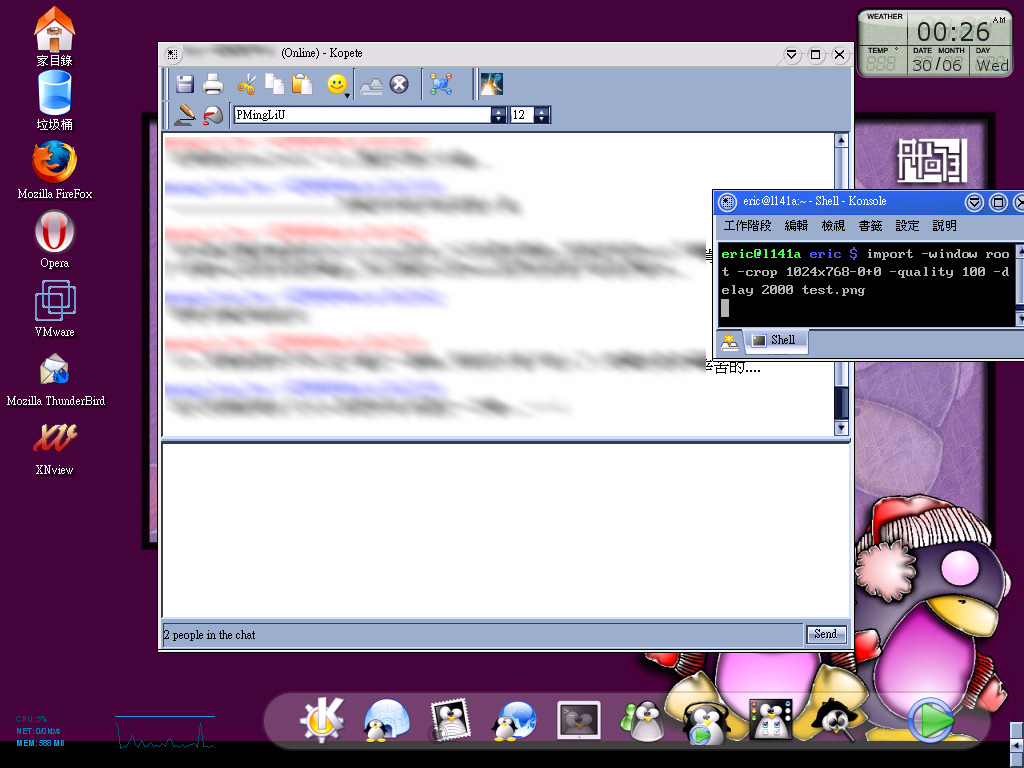
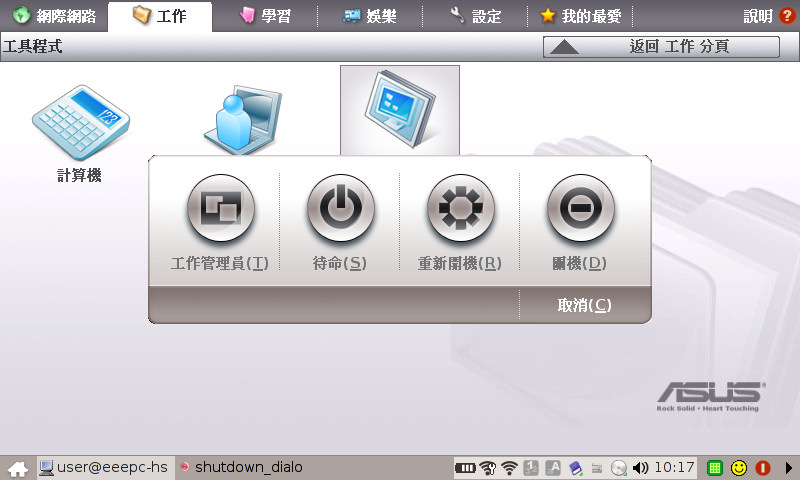
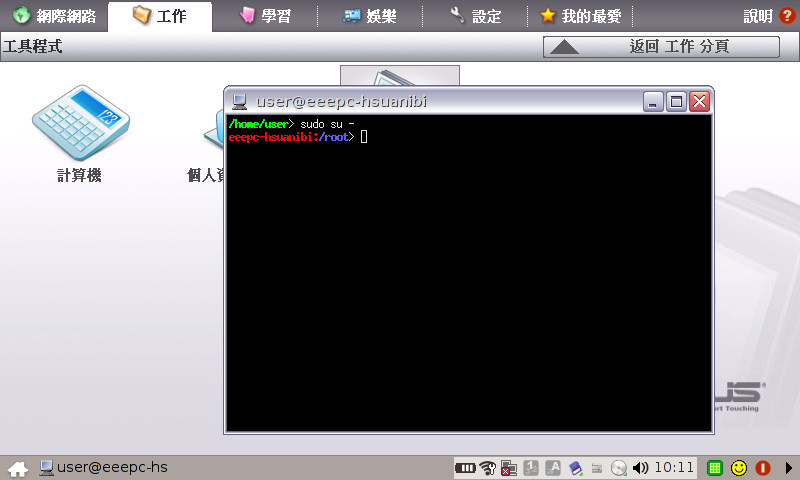
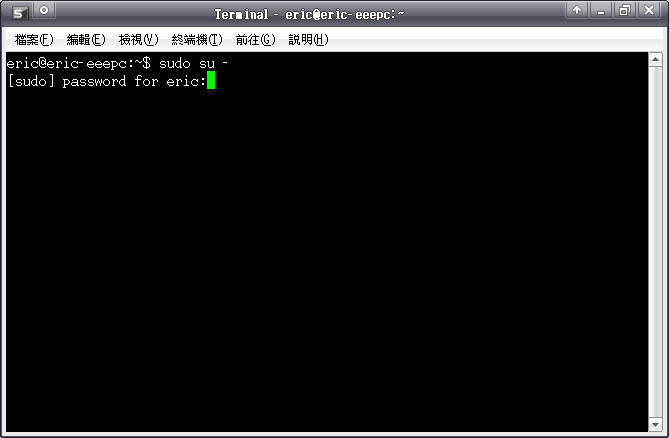
    <summary><![CDATA[話說之前用過頗長時間 Gentoo Linux 作為桌面系統, 但是公司產品以 win32 為主, 當年的 notebook 硬體又不夠力(ASUStek L141A: Pentium-M III 1.13GHz, 1GB RAM), 每次測試自家產品就得開VMware, 十分累人...最後只好認命的回歸 windows...貼圖留念一下當時的 Gentoo 桌面...回到正題, 由於電腦裡總是會有些重要而敏感的資料, 像A片、A圖..不..不..不...是公司重要信件、ssh private key這些, 所以離開電腦前總是會有個好習慣 &quot;鎖定工作站&quot;, 這功能在各家 window manager、Windows NT4/2000/XP/Vista 都找得到, 就連 XP home 都可以透過 Windows Key+L 來鎖定電腦, 但在華碩這個 distribution 竟然找不到, 請看以下關機畫面...沒有鎖定跟登出, 就算不能鎖定並保留工作狀態, 至少也給我個登出嘛...我很努力的把整個 UI 翻進翻出...可是...就是沒有...表示是說...要離開電腦去個洗手間, 為了自己的資料安全, 最好的方法就是 ---&gt; 關機!!!!因為即使選 &quot;待機&quot;, 等會開起來也是直接進入系統, 不會有任何密碼保護的, 密碼保護唯一出現的時機就是剛開機的時候... orz另外一個比較明顯的安全問題是 sudo, 在華碩這個版本預設方式是不用輸入任何密碼!!! 沒錯, 真的不用輸入密碼!!! 請看下圖用過 OS X 或是其他 類UNIX桌面系統 的人應該會注意到, 像是 OS X 需要系統權限時會彈出詢問密碼的對話框, 或是至少在 terminal 底下打 sudo XXXX 都需要輸入用戶密碼, 但是這個版本真的沒有...也就是請大家絕對要看好自己的 EeePC, 要去洗手間也要帶著 EeePC 去(因為這樣才做得這麼小?), 不然如果有人拿著 EeePC 的 terminal 打 &quot;sudo dd if=/dev/zero of=/dev/sda&quot; 或是 &quot;sudo rm -Rf&nbsp; /&quot; 之類的動作, 都會是毀天滅地的大災難啊...附上 eeeXubuntu 的 sudo, 看起來就正常多了, 預設會問密碼結論是 Eee PC 預設系統對許多安全環節做了簡化, 讓這套 Linux 在安全性上脆弱得嚇人, 要符合我的使用習慣還得動些手腳. 但這套系統還是很多地方做得不錯(像是速度、類PDA介面等), 有空再來說說他的好話好了.eeeXubuntu 雖然不錯, 但是似乎 ACPI 的問題還是沒有完全解決, 至少在我的 EeePC 上只要插著電源充電, 每次開機就會跳出電池錯誤的訊息, 不妨礙使用卻很煩人, 還有中文輸入法不會動的問題等...總之還是有好些功夫要自己動手.Windows XP則跟一般使用狀況差不多, 但是安裝上也需要做些手腳.最近頻繁地把 Eee 的系統換來換去, 突然想念起以前的 Sharp Zaurus SL-C750, 但那又是另外一個故事了. :p]]></summary>
    <content type="html"><![CDATA[話說之前用過頗長時間 Gentoo Linux 作為桌面系統, 但是公司產品以 win32 為主, 當年的 notebook 硬體又不夠力(ASUStek L141A: Pentium-M III 1.13GHz, 1GB RAM), 每次測試自家產品就得開VMware, 十分累人...最後只好認命的回歸 windows...貼圖留念一下當時的 Gentoo 桌面...<br /><a href="http://pic.pimg.tw/ericpi/1199418418.jpg" target="_blank"><img width="480" vspace="0" hspace="0" height="360" border="0" align="middle" src="http://pic.pimg.tw/ericpi/1199418418.jpg" alt="Gentoo Linux Desktop" /></a><br /><br />回到正題, 由於電腦裡總是會有些重要而敏感的資料, 像A片、A圖..不..不..不...是公司重要信件、ssh private key這些, 所以離開電腦前總是會有個好習慣 &quot;鎖定工作站&quot;, 這功能在各家 window manager、Windows NT4/2000/XP/Vista 都找得到, 就連 XP home 都可以透過 Windows Key+L 來鎖定電腦, 但在華碩這個 distribution 竟然找不到, 請看以下關機畫面...<br /><a href="http://pic.pimg.tw/ericpi/1199414543.png" target="_blank"><img width="480" vspace="0" hspace="0" height="288" border="0" align="middle" src="http://pic.pimg.tw/ericpi/1199414543.png" alt="EeePC 關機畫面" /></a><br />沒有鎖定跟登出, 就算不能鎖定並保留工作狀態, 至少也給我個登出嘛...我很努力的把整個 UI 翻進翻出...可是...就是沒有...<br />表示是說...要離開電腦去個洗手間, 為了自己的資料安全, 最好的方法就是 ---&gt; 關機!!!!<br />因為即使選 &quot;待機&quot;, 等會開起來也是直接進入系統, 不會有任何密碼保護的, 密碼保護唯一出現的時機就是剛開機的時候... orz<br /><br />另外一個比較明顯的安全問題是 sudo, 在華碩這個版本預設方式是不用輸入任何密碼!!! 沒錯, 真的不用輸入密碼!!! 請看下圖<br /><a href="http://pic.pimg.tw/ericpi/1199414544.png" target="_blank"><img width="480" vspace="0" hspace="0" height="288" border="0" align="middle" src="http://pic.pimg.tw/ericpi/1199414544.png" alt="EeePC sudo terminal" /></a><br />用過 OS X 或是其他 類UNIX桌面系統 的人應該會注意到, 像是 OS X 需要系統權限時會彈出詢問密碼的對話框, 或是至少在 terminal 底下打 sudo XXXX 都需要輸入用戶密碼, 但是這個版本真的沒有...<br />也就是請大家絕對要看好自己的 EeePC, 要去洗手間也要帶著 EeePC 去(因為這樣才做得這麼小?), 不然如果有人拿著 EeePC 的 terminal 打 &quot;sudo dd if=/dev/zero of=/dev/sda&quot; 或是 &quot;sudo rm -Rf&nbsp; /&quot; 之類的動作, 都會是毀天滅地的大災難啊...<br /><br />附上 <a href="http://wiki.eeeuser.com/ubuntu:eeexubuntu:home" target="_blank">eeeXubuntu</a> 的 sudo, 看起來就正常多了, 預設會問密碼<br /><a href="http://pic.pimg.tw/ericpi/1199414545.png" target="_blank"><img width="480" vspace="0" hspace="0" height="314" border="0" align="middle" src="http://pic.pimg.tw/ericpi/1199414545.png" alt="eeeXubuntu 終端機 sudo 指令" /></a><br /><br />結論是 Eee PC 預設系統對許多安全環節做了簡化, 讓這套 Linux 在安全性上脆弱得嚇人, 要符合我的使用習慣還得動些手腳. 但這套系統還是很多地方做得不錯(像是速度、類PDA介面等), 有空再來說說他的好話好了.<br /><a href="http://wiki.eeeuser.com/ubuntu:eeexubuntu:home" target="_blank">eeeXubuntu</a> 雖然不錯, 但是似乎 ACPI 的問題還是沒有完全解決, 至少在我的 EeePC 上只要插著電源充電, 每次開機就會跳出電池錯誤的訊息, 不妨礙使用卻很煩人, 還有中文輸入法不會動的問題等...總之還是有好些功夫要自己動手.<br />Windows XP則跟一般使用狀況差不多, 但是安裝上也需要做些手腳.<br /><br />最近頻繁地把 Eee 的系統換來換去, 突然想念起以前的 <a title="Sharp Zaurus SL-C750" name="Sharp Zaurus SL-C750" target="_blank" href="http://www.sharp.co.jp/products/slc750/index.html">Sharp Zaurus SL-C750</a>, 但那又是另外一個故事了. :p<br /><br />  <div class="more"><a href="http://ericpi.pixnet.net/blog/post/12583721">(Read More...)</a></div>]]></content>
    <category term="EeePC 好好玩"/>
    <wfw:comment xmlns:wfw="http://wellformedweb.org/CommentAPI/">http://ericpi.pixnet.net/blog/post/12583721#comments</wfw:comment>
  </entry>
  <entry xmlns:wfw="http://wellformedweb.org/CommentAPI/">
    <id>http://ericpi.pixnet.net/blog/post/12542212</id>
    <title><![CDATA[FreeBSD 產生 apache2 ssl 認證]]></title>
    <updated>2008-01-03T00:58:19+08:00</updated>
    <link rel="alternate" href="http://ericpi.pixnet.net/blog/post/12542212"/>
    <summary><![CDATA[已經產生好幾十次了, 從來沒記起來過, 每次都是翻 gentoo wiki 來看, 這次自己筆記一下.$ sudo mkdir /usr/local/apache2/ssl.key$ sudo mkdir /usr/local/apache2/ssl.crt$ cd /usr/local/apache2/ssl.key$ sudo openssl genrsa -des3 -out server.key 1024$ sudo openssl genrsa -out server.key 1024$ sudo openssl rsa -in server.key -out server.pem$ sudo openssl req -new -key server.pem -out server.csr$ sudo openssl x509 -req -days 365 -in server.csr -signkey server.pem -out server.crt$ cd server.crt ../ssl.crt其他 distribution 產生方式也差不多,&nbsp; 大致就是路徑不太一樣.]]></summary>
    <content type="html"><![CDATA[已經產生好幾十次了, 從來沒記起來過, 每次都是翻 gentoo wiki 來看, 這次自己筆記一下.<br />$ sudo mkdir /usr/local/apache2/ssl.key<br />$ sudo mkdir /usr/local/apache2/ssl.crt<br />$ cd /usr/local/apache2/ssl.key<br />$ sudo openssl genrsa -des3 -out server.key 1024<br />$ sudo openssl genrsa -out server.key 1024<br />$ sudo openssl rsa -in server.key -out server.pem<br />$ sudo openssl req -new -key server.pem -out server.csr<br />$ sudo openssl x509 -req -days 365 -in server.csr -signkey server.pem -out server.crt<br />$ cd server.crt ../ssl.crt<br /><br />其他 distribution 產生方式也差不多,&nbsp; 大致就是路徑不太一樣.  <div class="more"><a href="http://ericpi.pixnet.net/blog/post/12542212">(Read More...)</a></div>]]></content>
    <category term="系統管理"/>
    <wfw:comment xmlns:wfw="http://wellformedweb.org/CommentAPI/">http://ericpi.pixnet.net/blog/post/12542212#comments</wfw:comment>
  </entry>
  <entry xmlns:wfw="http://wellformedweb.org/CommentAPI/">
    <id>http://ericpi.pixnet.net/blog/post/12373640</id>
    <title><![CDATA[蒙面狗 Zorro?]]></title>
    <updated>2007-12-29T11:39:58+08:00</updated>
    <link rel="alternate" href="http://ericpi.pixnet.net/blog/post/12373640"/>
    <summary><![CDATA[一直覺得北京這個城市的氣氛很浮躁, 有時候看看 PaPa 裝無辜的照片總能在思鄉的情緒裡有點慰藉.PaPa是隻流浪狗, 本來是鄰居收留的, 但是由於他們工作忙, 於是常常放到我家裡 &quot;安親&quot;, 誰知道最後鄰居決定不養, 老媽就接手收留這隻不管是 &quot;配色&quot; 或者是行為都非常搞笑的狗...很多大陸朋友看到他, 都覺得顏色像隻熊貓, 我倒是覺得他像 &quot;蒙面狗 Zorro&quot;.. :p]]></summary>
    <content type="html"><![CDATA[<img width="480" vspace="0" hspace="0" height="360" border="0" align="middle" src="http://pic.pimg.tw/ericpi/1198899962.jpg" alt="papa的回眸" /><br />一直覺得北京這個城市的氣氛很浮躁, 有時候看看 PaPa 裝無辜的照片總能在思鄉的情緒裡有點慰藉.<br />PaPa是隻流浪狗, 本來是鄰居收留的, 但是由於他們工作忙, 於是常常放到我家裡 &quot;安親&quot;, 誰知道最後鄰居決定不養, 老媽就接手收留這隻不管是 &quot;配色&quot; 或者是行為都非常搞笑的狗...<br /><br />很多大陸朋友看到他, 都覺得顏色像隻熊貓, 我倒是覺得他像 &quot;蒙面狗 Zorro&quot;.. :p  <div class="more"><a href="http://ericpi.pixnet.net/blog/post/12373640">(Read More...)</a></div>]]></content>
    <category term="我家的小老弟"/>
    <wfw:comment xmlns:wfw="http://wellformedweb.org/CommentAPI/">http://ericpi.pixnet.net/blog/post/12373640#comments</wfw:comment>
  </entry>
  <entry xmlns:wfw="http://wellformedweb.org/CommentAPI/">
    <id>http://ericpi.pixnet.net/blog/post/12340855</id>
    <title><![CDATA[北京又下雪了]]></title>
    <updated>2007-12-28T08:49:13+08:00</updated>
    <link rel="alternate" href="http://ericpi.pixnet.net/blog/post/12340855"/>
    <summary><![CDATA[今天早上出門發現前夜下了小雪, 路面濕漉漉的, 路旁樹上還有些許雪的痕跡.這是今年第二次碰到北京的雪, 上次比較 high 一點, 上班的時候還可以看到雪花片片, 這次卻只剩幾攤爛泥.. :p]]></summary>
    <content type="html"><![CDATA[今天早上出門發現前夜下了小雪, 路面濕漉漉的, 路旁樹上還有些許雪的痕跡.<br />這是今年第二次碰到北京的雪, 上次比較 high 一點, 上班的時候還可以看到雪花片片, 這次卻只剩幾攤爛泥.. :p  <div class="more"><a href="http://ericpi.pixnet.net/blog/post/12340855">(Read More...)</a></div>]]></content>
    <category term="北京生活日記"/>
    <wfw:comment xmlns:wfw="http://wellformedweb.org/CommentAPI/">http://ericpi.pixnet.net/blog/post/12340855#comments</wfw:comment>
  </entry>
</feed>